
The Lova application is a digital wallet available in BiH that can significantly simplify your daily activities, and Lova Depositron is one of the ways to deposit and withdraw funds. After downloading the application and completing the registration process, you gain access to your digital wallet, which can be topped up in several ways. Additionally, you can withdraw money from the Lova application, with multiple methods available for doing so. The application is available for download on both the Google Play Store and the App Store, and the registration process is explained in detail in this video. This article will discuss Lova Depositron as a method for depositing and withdrawing funds within the application.
Lova Depositron as a Deposit Method
When you want to top up, or more precisely, deposit funds into your KM Lova wallet, you have the following options:
- bank transfer
- PayPal deposit
- Lova top-up
- Lova voucher deposit
- Lova Depositron deposit
In this article, we will focus on this last item: depositing funds via Lova Depositron, so let's explain how this deposit method works. To select this method, choose the option Lova Depositron from the application's home screen, as shown in the image below:
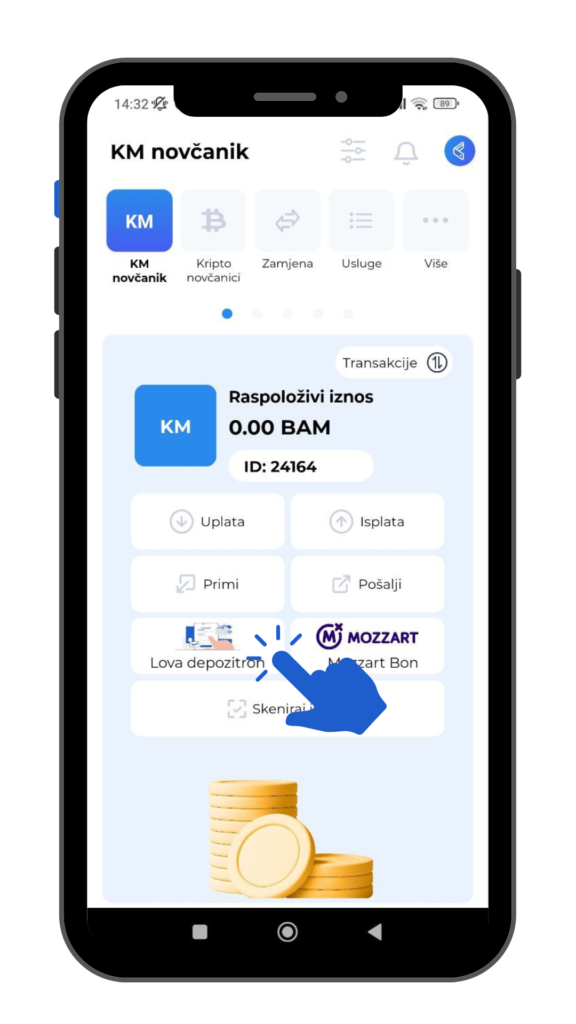
To deposit money this way, you need to enter a specific code. You received this code previously when withdrawing funds from certain gambling operators. So, you withdrew your winnings and chose as the withdrawal method Lova application, lova.ba. After that, a withdrawal code is generated and sent to your email, which you will then enter into Lova depositron payment. A video tutorial, where the entire process is explained in detail, step by step, can be viewed at this link.
Lova depositron as a withdrawal method
On the other hand, when you want to withdraw money from the Lova application, the following options are available:
- withdrawal to a bank account
- withdrawal to a PayPal account
- withdrawal via Lova depositron
Here, we will focus on the last item and explain how to withdraw your funds via Lova depositron. The first thing you need to do is select the option Withdrawal from the application's home screen, as shown in the image below:

After that, a field will open showing all available withdrawal methods in a dropdown menu, where you need to select Lova Depozitron and enter the desired amount you wish to withdraw. Available amounts are: 10KM, 20KM, 50KM, 100KM, 200 KM, and recently, 500KM, which also represents the maximum daily withdrawal amount via Lova Depozitron. If your phone's GPS is enabled, it will automatically suggest the nearest location; if disabled, a list of all available locations where you can make withdrawals this way will be provided. This withdrawal method means you receive cash at your chosen location. These are typically gas stations and kiosks where you can withdraw and deposit funds to the Lova app. You can view a list of all available locations at this link.In addition to depositing and withdrawing funds from the Lova platform, this application also allows you to easily pay with your KM or crypto wallet, and you can view a list of all Lova payment locations at this link. Currently, this payment method has been added to over 120 locations across BiH, and the number of these locations will certainly grow over time.
Conclusion
So, depositing and withdrawing funds to and from the Lova app is possible via Lova Depozitron. Specifically, deposits are made by transferring winnings from certain lottery or gambling providers, while withdrawals involve picking up cash at your nearest gas station or kiosk. The maximum daily amount for this withdrawal method is now 500 KM. The Lova app is available for Android and iOS users. After downloading it, you need to complete the registration process, which is explained in detail in this video tutorial. So, watch the video and follow the registration instructions if you haven't become a Lova platform user yet.

